FeaturesPricing
Open AppGet Started

Set it once.
Run it forever.

Build trigger-based automations in minutes. When a record is created, a deal advances, or a task lands — SafiTrack handles the follow-through so your team doesn't have to.

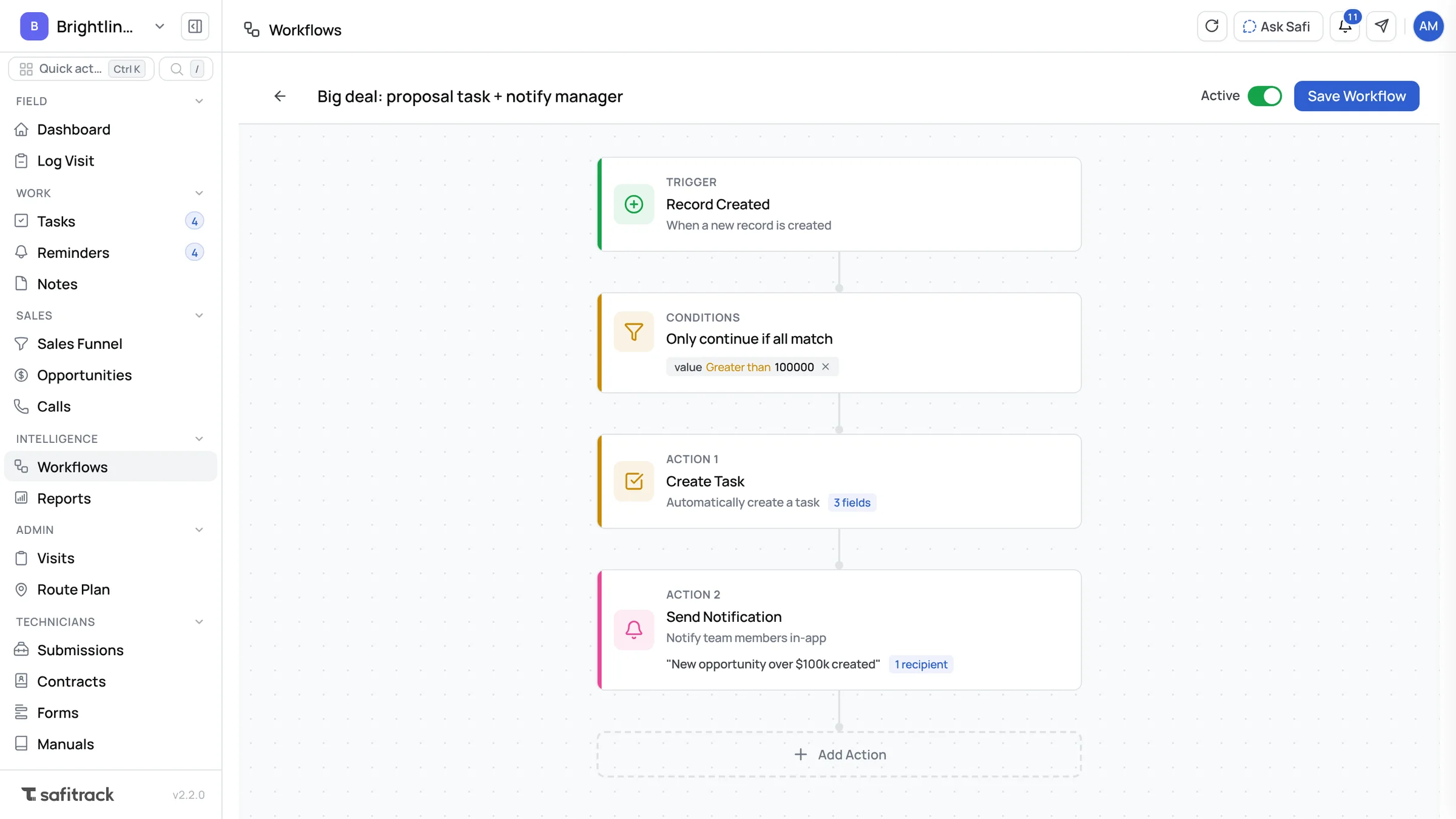
Workflow Builder
Save Draft Activate
My Workflows
Lead Follow-up
Active · 2 actions
Deal Stage Update
Inactive · 1 action
Task Auto-assign
Active · 3 actions
+ New Workflow
Lead Follow-up — Builder
 TRIGGER
Record Created
Object: Company
company_type is Prospect
 ACTION 1
Create Task
Title: "Schedule intro call"
Due: 2 days · Priority: High
 ACTION 2
Update Opportunity
Stage: Qualification
Next step: "Discovery call booked"
Add another action

Three steps to automated

No developers. No scripts. Just pick a trigger, choose your actions, and go live in minutes.

Step 1
Choose a Trigger
Pick what kicks the workflow off — a new record, an update, or a new task.
Step 2
Define Actions
Chain one or more actions — create tasks, update records, or move opportunities through the pipeline.
Step 3
Go Live
Flip the switch. Your workflow activates instantly and runs silently in the background on every matching event.

React to every
change in real time

Workflows fire the moment something meaningful happens in your CRM. No polling. No delays. Just instant execution.

  • Record Created — Company, Person, or Opportunity added to your CRM
  • Record Updated — Any field change on any object fires the chain
  • Task Created — New task triggers follow-on automations across deals and contacts
Record Created
Fires when a new Company, Person, or Opportunity is added
Record Updated
Responds to any field change on an existing record
Task Created
Triggers when a new task is created anywhere in the system
More triggers coming soon

Do the work
your team forgets

Stack multiple actions in a single workflow. Each one runs in order, automatically — no matter how busy the day gets.

  • Create records — new companies, people, or opportunities
  • Update existing records — advance a deal stage, update a field value
  • Create or update tasks — assign, prioritize, and set due dates automatically
Action chain preview
Create Task
"Schedule intro call"
Assigned to owner · Due in 2 days · Priority: High
Update Opportunity
Stage → Qualification
Sets next step to "Discovery call booked"
Update Task
Status → In Progress
Sets description to "Customer added to pipeline"

Ready to run in one click

Start from a proven automation pattern, then customize it to fit your team. Or build from scratch — it takes the same amount of time.

New Lead Nurture

When a Company is created with type "Prospect" → create an intro task + move linked opportunity to Qualification.

Record Created 2 Actions

Deal Stage Advance

When an Opportunity is updated to "Proposal" → create a follow-up task with a 3-day deadline for the deal owner.

Record Updated 1 Action

Task Auto-assign

When a Task is created without an assignee → assign it to the company's owner and set priority to Medium automatically.

Task Created 1 Action

Post-Call Follow-up

When a Person record is updated after a call → create a "Send follow-up email" task and set the opportunity's next step date.

Record Updated 2 Actions

Win / Loss Logging

When an Opportunity moves to Closed-Won → create an onboarding task. When Closed-Lost → update company type to "Dormant".

Record Updated 3 Actions

Build Your Own

Start from a blank canvas and wire up any trigger to any combination of actions. The builder is open — the possibilities aren't limited.

Custom Workflow
faster lead follow-up when workflows are active
2h
saved per rep, per week on manual data entry
100%
of runs logged — full audit trail always visible

Built for real automation needs

Instant execution

Workflows fire immediately — no cron jobs, no batch delays. Your automations run the moment the trigger condition is met.

Multi-step chains

Stack as many actions as you need in a single workflow. Each action runs in sequence, ensuring nothing gets skipped.

Toggle without deleting

Pause any workflow instantly and re-enable it later. Your configuration is always saved, nothing is ever lost.

Works across all objects

Companies, People, Opportunities, and Tasks — every CRM object you work with is a valid trigger and action target.

Live search in builder

The workflow builder autocompletes records and fields as you type. Building a workflow feels like a conversation, not a form.

Full audit trail

Every workflow run is logged with timestamps and outcomes. Know exactly what ran, when, and on which record.

Ready to stop doing
things manually?

Set up your first workflow in under 5 minutes. No training required.

Open Workflow Builder